
GMC Terrain: Initial Drive Information / Windows
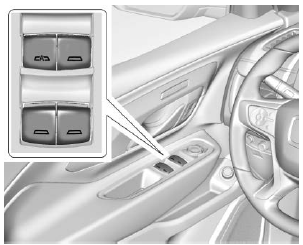
The power windows work when the ignition is on, in ACC/ACCESSORY, or when Retained Accessory Power (RAP) is active.
Using the window switch, press to open or pull to close the window.
The windows may be temporarily disabled if they are used repeatedly within a short time.
 Liftgate
Manual Liftgate Operation
Unlock the vehicle before opening
the liftgate.
To open the liftgate, press the touch
pad on the bottom of the liftgate and
lift up...
 Seat Adjustment - Manual Front Seats
To adjust a manual seat:
Pull the handle at the front of
the seat.
Slide the seat to the desired
position and release the
handle.
Try to move the seat back and
forth to be sure it is locked in
place...
Other information:
GMC Terrain 2018-2026 Owners Manual: General Information
Your vehicle is an important investment. This section describes the required maintenance for the vehicle. Follow this schedule to help protect against major repair expenses resulting from neglect or inadequate maintenance. It may also help to maintain the value of the vehicle if it is sold...
GMC Terrain 2018-2026 Owners Manual: Gas Strut(s)
This vehicle is equipped with gas strut(s) to provide assistance in lifting and holding open the hood/ trunk/liftgate system in full open position. Warning If the gas struts that hold open the hood, trunk, and/or liftgate fail, you or others could be seriously injured...
- Manuals Home
- 2nd Generation Terrain Owners Manual
- 2nd Generation Terrain Service Manual
- Vehicle Alarm System
- Seat Adjustment - Manual Front Seats
- Power Outlets
- New on site
- Most important about car
Categories
Vehicle Messages
Messages displayed on the DIC indicate the status of the vehicle or some action that may be needed to correct a condition. Multiple messages may appear one after another.
The messages that do not require immediate action can be acknowledged and cleared by pressing V. The messages that require immediate action cannot be cleared until that action is performed.

Copyright © 2026 www.gmcterrain2.com