
GMC Terrain: Warning Lights, Gauges, and Indicators / Tire Pressure Light
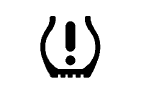
For vehicles with the Tire Pressure Monitor System (TPMS), this light comes on briefly when the engine is started. It provides information about tire pressures and the TPMS.
When the Light Is On Steady
This indicates that one or more of the tires are significantly underinflated.
A Driver Information Center (DIC) tire pressure message may also display. Stop as soon as possible, and inflate the tires to the pressure value shown on the Tire and Loading Information label. See Tire Pressure.
When the Light Flashes First and Then Is On Steady
If the light flashes for about a minute and then stays on, there may be a problem with the TPMS. If the problem is not corrected, the light will come on at every ignition cycle. See Tire Pressure Monitor Operation.
 Wait-to-Start Light
For diesel engines, the wait-to-start
light shows that the engine is
functioning properly and indicates
when the engine can be started.
The fast warm-up glow plug system
makes the wait-to-start light stay on
for a shorter amount of time than
most diesel engines...
 Engine Oil Pressure Light
Caution
Lack of proper engine oil
maintenance can damage the
engine. Driving with the engine oil
low can also damage the engine.
The repairs would not be covered
by the vehicle warranty...
Other information:
GMC Terrain 2018-2026 Owners Manual: Folding Seatback
The front passenger seatback folds flat. Warning If you fold the seatback forward to carry longer objects, such as skis, be sure any such cargo is not near an airbag. In a crash, an inflating airbag might force that object toward a person. This could cause severe injury or even death...
GMC Terrain 2018-2026 Owners Manual: Curves in the Road
Warning On curves, ACC may not detect a vehicle ahead in your lane. You could be startled if the vehicle accelerates up to the set speed, especially when following a vehicle exiting or entering exit ramps. You could lose control of the vehicle or crash...
- Manuals Home
- 2nd Generation Terrain Owners Manual
- 2nd Generation Terrain Service Manual
- Setting Cruise Control
- Wireless Charging
- Vehicle Alarm System
- New on site
- Most important about car
Categories
Tire Pressure Light
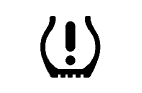
For vehicles with the Tire Pressure Monitor System (TPMS), this light comes on briefly when the engine is started. It provides information about tire pressures and the TPMS.
