
GMC Terrain: Keys and Locks / Safety Locks
The rear door safety locks prevent passengers from opening the rear doors from inside the vehicle.
Manual Safety Locks
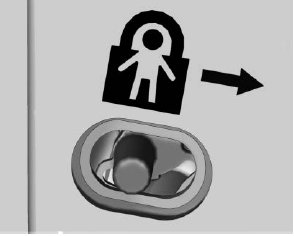
If equipped, the safety lock is on the inside edge of the rear doors. To use the safety lock:
- Move the lever down to the lock position.
- Close the door.
- Do the same for the other rear door.
To open a rear door when the safety lock is on:
- Unlock the door by activating the inside handle, by pressing the power door lock switch, or by using the Remote Keyless Entry (RKE) transmitter.
- Open the door from the outside.
When the safety lock is enabled, adults and older children will not be able to open the rear door from the inside. Cancel the safety locks to enable the doors to open from the inside.
To cancel the safety lock:
- Unlock the door and open it from the outside.
- Move the lever up to unlock. Do the same for the other door.
 Lockout Protection
If the ignition is on or in ACC/
ACCESSORY and the power door
lock switch is pressed with the
driver door open, all the doors will
lock and only the driver door will
unlock...
 Doors
Doors
..
Other information:
GMC Terrain 2018-2026 Owners Manual: Lane Change Alert (LCA)
If equipped, the LCA system is a lane-changing aid that assists drivers with avoiding lane change crashes that occur with moving vehicles in the side blind zone (or spot) areas or with vehicles rapidly approaching these areas from behind. The LCA warning display will light up in the corresponding outside mirror and will flash if the turn signal is on. Warning LCA does not alert the drive..
GMC Terrain 2018-2026 Owners Manual: Remote Vehicle Start
If equipped, the engine can be started from outside of the vehicle. Starting the Vehicle Press and release on the RKE transmitter. Immediately press and hold for at least four seconds or until the turn signal lamps flash. When the vehicle starts, the parking lamps will turn on. Remote start can be extended. Start the vehicle normally after entering. Canceling a Remote Start To cance..

Copyright © 2026 www.gmcterrain2.com