
GMC Terrain: Rear Seats / Raising the Seatback
GMC Terrain 2018-2026 Owners Manual / Seats and Restraints / Rear Seats / Rear Seats / Raising the Seatback
Warning
If either seatback is not locked, it could move forward in a sudden stop or crash. That could cause injury to the person sitting there. Always push and pull on the seatbacks to be sure they are locked.
Warning
A seat belt that is improperly routed, not properly attached, or twisted will not provide the protection needed in a crash. The person wearing the belt could be seriously injured. After raising the rear seatback, always check to be sure that the seat belts are properly routed and attached, and are not twisted.
To raise a seatback:
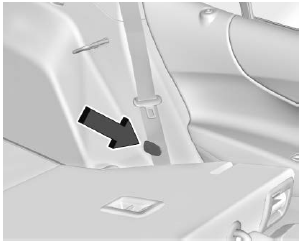
- Ensure the seat belt is in the belt stowage clip.
- Lift the seatback up and push it
rearward to lock it in place.
A tab near the seatback lever retracts when the seatback is locked in place.
- Return the head restraint to the upright position. See Head Restraints.
- Push and pull the top of the seatback to be sure it is locked into position.
- Repeat the steps to raise the other seatback, if necessary.
When the seat is not in use, it should be kept in the upright, locked position.
 Folding the Seatback
Either side of the seatback can be
folded for more cargo space. Fold a
seatback only when the vehicle is
not moving.
Caution
Folding a rear seat with the seat
belts still fastened may cause
damage to the seat or the seat
belts...
 Heated Rear Seats
Warning
If temperature change or pain to
the skin cannot be felt, the seat
heater may cause burns. See the
Warning under Heated and
Ventilated Front Seats...
Other information:
GMC Terrain 2018-2026 Owners Manual: Keys. Remote Keyless Entry (RKE) System
Keys Warning Leaving children in a vehicle with a Remote Keyless Entry (RKE) transmitter is dangerous and children or others could be seriously injured or killed. They could operate the power windows or other controls or make the vehicle move. The windows will function with the RKE transmitter in the vehicle, and children or others could be caught in the path of a closing window...
GMC Terrain 2018-2026 Owners Manual: Gasoline
Warning Never fill a portable fuel container while it is in the vehicle. Static electricity discharge from the container can ignite the fuel vapor. You can be badly burned and the vehicle damaged if this occurs. To help avoid injury to you and others: Dispense fuel only into approved containers...

Copyright © 2026 www.gmcterrain2.com