
GMC Terrain: Warning Lights, Gauges, and Indicators / Electric Parking Brake Light and Service Electric Parking Brake Light
Electric Parking Brake Light
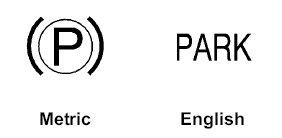
This light comes on when the parking brake is applied. If the light continues flashing after the parking brake is released, or while driving, there is a problem with the Electric Parking Brake system. A message may also display in the Driver Information Center (DIC).
If the light does not come on, or remains flashing, see your dealer.
Service Electric Parking Brake Light

This light should come on briefly when starting the vehicle. If it does not come on, have it fixed so it will be ready to warn if there is a problem.
If this light stays on, take the vehicle to your dealer as soon as possible. See the information for the Electric Parking Brake under Electric Parking Brake. A message may also display in the Driver Information Center (DIC).
 Brake System Warning Light
The vehicle brake system consists
of two hydraulic circuits. If one
circuit is not working, the remaining
circuit can still work to stop the
vehicle...
 Antilock Brake System (ABS) Warning Light
For vehicles with the Antilock Brake
System (ABS), this light comes on
briefly when the engine is started.
If the light does not come on, have it
fixed so it will be ready to warn if
there is a problem...
Other information:
GMC Terrain 2018-2026 Owners Manual: Driver Information Center (DIC) (Base and Midlevel)
The DIC displays are shown in the center of the instrument cluster in the Info app. See Instrument Cluster (Base and Midlevel) or Instrument Cluster (Uplevel). The displays show the status of many vehicle systems. The controls for the DIC are on the right steering wheel control...
GMC Terrain 2018-2026 Owners Manual: Power Liftgate Operation
Warning You or others could be injured if caught in the path of the power liftgate. Make sure there is no one in the way of the liftgate as it is opening and closing. Caution To avoid damage to the liftgate or liftgate glass, make sure the area above and behind the liftgate is clear before opening it...
