
GMC Terrain: Initial Drive Information / Steering Wheel Adjustment
GMC Terrain 2018-2026 Owners Manual / In Brief / Initial Drive Information / Steering Wheel Adjustment
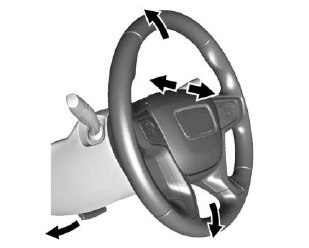
To adjust the steering wheel:
- Pull the lever down.
- Move the steering wheel up or down.
- Pull or push the steering wheel closer or away from you.
- Pull the lever up to lock the steering wheel in place.
Do not adjust the steering wheel while driving.
 Interior
Adjustment
Adjust the rearview mirror to clearly
view the area behind the vehicle.
Manual Rearview Mirror
For vehicles with a manual rearview
mirror, push the tab forward for
daytime use and pull it rearward for
nighttime use to avoid the glare of
the headlamps from behind...

Other information:
GMC Terrain 2018-2026 Owners Manual: Additional Factors Affecting System Operation
Seat belts help keep the passenger in position on the seat during vehicle maneuvers and braking, which helps the passenger sensing system maintain the passenger airbag status. See “Seat Belts” and “Child Restraints” in the Index for additional information about the importance of proper restraint use. A thick layer of additional material, such as a blanket or cushion, or aftermark..
GMC Terrain 2018-2026 Owners Manual: Info Pages
The following is the list of all possible DIC info page displays. Some may not be available for your particular vehicle. Some items may not be turned on by default but can be turned on through the Options app. See “ Info Page Options” earlier in this section. Speed : Shows the vehicle speed in either kilometers per hour (km/h) or miles per hour (mph). If equipped, press to open the ..
- Manuals Home
- 2nd Generation Terrain Owners Manual
- 2nd Generation Terrain Service Manual
- Power Outlets
- Wireless Charging
- Hazard Warning Flashers
- New on site
- Most important about car
Categories
Vehicle Messages
Messages displayed on the DIC indicate the status of the vehicle or some action that may be needed to correct a condition. Multiple messages may appear one after another.
The messages that do not require immediate action can be acknowledged and cleared by pressing V. The messages that require immediate action cannot be cleared until that action is performed.

Copyright © 2026 www.gmcterrain2.com