
GMC Terrain: Front Seats / Lumbar Adjustment and Reclining Seatbacks
Lumbar Adjustment
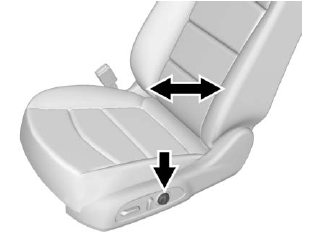
If equipped, press and hold the front or rear of the control to increase or decrease lumbar support.
Reclining Seatbacks
Warning
Sitting in a reclined position when the vehicle is in motion can be dangerous. Even when buckled up, the seat belts cannot do their job.
The shoulder belt will not be against your body. Instead, it will be in front of you. In a crash, you could go into it, receiving neck or other injuries.
The lap belt could go up over your abdomen. The belt forces would be there, not at your pelvic bones. This could cause serious internal injuries.
For proper protection when the vehicle is in motion, have the seatback upright. Then sit well back in the seat and wear the seat belt properly.
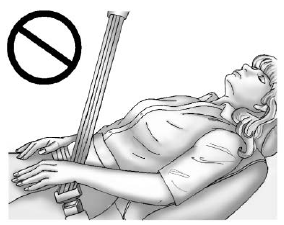
Do not have a seatback reclined if the vehicle is moving.
 Power Seat Adjustment
Warning
The power seats will work with
the ignition off. Children could
operate the power seats and be
injured. Never leave children
alone in the vehicle...
 Manual Reclining Seatbacks
Warning
If either seatback is not locked, it
could move forward in a sudden
stop or crash. That could cause
injury to the person sitting there.
Always push and pull on the
seatbacks to be sure they are
locked...
Other information:
GMC Terrain 2018-2026 Owners Manual: Speedometer, Odometer, Trip Odometer and Tachometer
Speedometer The speedometer shows the vehicle's speed in either kilometers per hour (km/h) or miles per hour (mph). Odometer The odometer shows how far the vehicle has been driven, in either kilometers or miles. Trip Odometer The trip odometer shows how far the vehicle has been driven since the trip odometer was last reset...
GMC Terrain 2018-2026 Owners Manual: Engine Compartment Overview
1.5L Gas Engine Engine Air Cleaner/Filter. Engine Oil Fill Cap. See Engine Oil. Engine Oil Dipstick. See Engine Oil. Engine Cooling Fan. See Cooling System. Brake Fluid Reservoir. See Brake Fluid. Engine Compartment Fuse Block. Remote Positive (+) Terminal (Under Cover)...
- Manuals Home
- 2nd Generation Terrain Owners Manual
- 2nd Generation Terrain Service Manual
- Seat Adjustment
- Interior Lighting
- (TCS) / (ESC). Turning the Systems Off and On (Uplevel Cluster)
- New on site
- Most important about car
Categories
Vehicle Personalization
The following are all possible vehicle personalization features. Depending on the vehicle, some may not be available.
For System, Apps, and Personal features and functions, see “Settings” in the infotainment manual.
To access the vehicle personalization menu:
Touch the Settings icon on the Home Page of the infotainment display. Touch Vehicle to display a list of available options. Touch to select the desired feature setting. Touch or R to turn a
feature
off or on.
Touch
or R to turn a
feature
off or on.
Touch  to go to the top
level
of the Settings menu.
to go to the top
level
of the Settings menu.
