
GMC Terrain: Remote Keyless Entry (RKE) System Operation / Keyless Access Operation
With the Keyless Access system, you can lock and unlock the doors and access the liftgate without removing the RKE transmitter from your pocket, purse, briefcase, etc. The RKE transmitter should be within 1m(3 ft) of the liftgate or door being opened.
Keyless Access can be programmed to unlock all doors on the first lock/unlock press from the driver door. See Vehicle Personalization.
If equipped with memory seats, RKE transmitters 1 and 2 are linked to the seating positions of memory 1 or 2. See Memory Seats.
Keyless Unlocking/Locking from the Driver Door
When the doors are locked and the RKE transmitter is within 1m(3 ft) of the driver door handle, pressing the lock/unlock button on the driver door handle will unlock the driver door. If the lock/unlock button is pressed again within five seconds, all passenger doors will unlock.
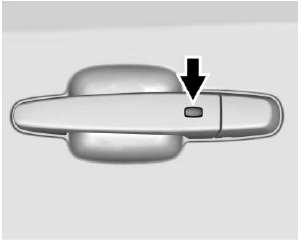
Driver Shown, Passenger Similar
Pressing the lock/unlock button will cause all doors to lock if any of the following occur:
- It has been more than five seconds since the first lock/ unlock button press.
- Two lock/unlock button presses were used to unlock all doors.
- Any vehicle door has opened and all doors are now closed.
Keyless Unlocking/Locking from Passenger Doors
When the doors are locked and the RKE transmitter is within 1m(3 ft) of the door handle, pressing the lock/ unlock button on that door handle will unlock all doors. Pressing the lock/unlock button will cause all doors to lock if any of the following occur:
- The lock/unlock button was used to unlock all doors.
- Any vehicle door has opened and all doors are now closed.
Passive Locking
If equipped with Keyless Access, this vehicle will lock several seconds after all doors are closed if the vehicle is off and at least one RKE transmitter has been removed or none remain in the interior.
If other electronic devices interfere with the RKE transmitter signal, the vehicle may not detect the RKE transmitter inside the vehicle. If passive locking is enabled, the doors may lock with the RKE transmitter inside the vehicle. Do not leave the RKE transmitter in an unattended vehicle.
To customize the doors to automatically lock when exiting the vehicle, see “Remote Lock, Unlock, Start” under Vehicle Personalization.
Temporary Disable of Passive Locking
Temporarily disable passive locking
by pressing and holding  on the
interior door switch with a door open
for at least four seconds, or until
three chimes are heard. Passive
locking will then remain disabled
until
on the
interior door switch with a door open
for at least four seconds, or until
three chimes are heard. Passive
locking will then remain disabled
until  on the interior door is
pressed, or until the vehicle is
turned on.
on the interior door is
pressed, or until the vehicle is
turned on.
Remote Left in Vehicle Alert
When the vehicle is turned off and an RKE transmitter is left in the vehicle, the horn will chirp three times after all doors are closed. To turn on or off, see Vehicle Personalization.
Remote No Longer in Vehicle Alert
If the vehicle is on, with a door open and then all doors are closed, the vehicle will check for RKE transmitters inside. If an RKE transmitter is not detected, the Driver Information Center (DIC) will display NO REMOTE DETECTED and the horn will chirp three times. This occurs only once each time the vehicle is driven.
Keyless Liftgate Opening
Press the touch pad on the liftgate handle to open the liftgate if the RKE transmitter is within 1m (3 ft).
Key Access
To access a vehicle with a dead transmitter battery, see Door Locks.
 Remote Keyless Entry (RKE) System Operation
The Keyless Access system allows
for vehicle entry when the Remote
Keyless Entry (RKE) transmitter is
within 1m (3 ft). See “Keyless
Access Operation” following...
 Programming Transmitters to the Vehicle
Only RKE transmitters programmed
to the vehicle will work. If a
transmitter is lost or stolen, a
replacement can be purchased and
programmed through your dealer...
Other information:
GMC Terrain 2018-2026 Owners Manual: Tire Pressure Light
For vehicles with the Tire Pressure Monitor System (TPMS), this light comes on briefly when the engine is started. It provides information about tire pressures and the TPMS. When the Light Is On Steady This indicates that one or more of the tires are significantly underinflated...
GMC Terrain 2018-2026 Owners Manual: Tire Pressure
Tires need the correct amount of air pressure to operate effectively. Warning Neither tire underinflation nor overinflation is good. Underinflated tires, or tires that do not have enough air, can result in: Tire overloading and overheating which could lead to a blowout...
