
GMC Terrain: Setting Adaptive Cruise Control / Irregular Objects Affecting ACC
GMC Terrain 2018-2026 Owners Manual / Driving and Operating / Cruise Control / Setting Adaptive Cruise Control / Irregular Objects Affecting ACC
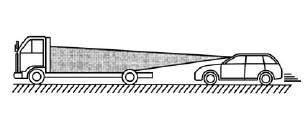
ACC may have difficulty detecting the following objects:
- Vehicles in front of your vehicle that have a rear aspect that is low, small, or irregular
- An empty truck or trailer that has no cargo in the cargo bed
- Vehicles with cargo extending from the back end
- Non-standard shaped vehicles, such as vehicle transport, vehicles with a side car fitted, or horse carriages
- Vehicles that are low to the road surface
- Objects that are close to the front of your vehicle
- Vehicles on which extremely heavy cargo is loaded in the cargo area or rear seat
 Stationary or Very Slow-Moving Objects
Warning
ACC may not detect and react to
stopped or slow-moving vehicles
ahead of you. For example, the
system may not brake for a
vehicle it has never detected
moving...
 ACC Automatically Disengages
ACC may automatically disengage
and the driver will need to manually
apply the brakes to slow the
vehicle if:
The front camera is blocked or
visibility is reduced...
Other information:
GMC Terrain 2018-2026 Owners Manual: Delayed Locking
This feature delays the actual locking of the doors until five seconds after all doors are closed. Delayed locking can only be turned on when the Open Door Anti-Lockout feature has been turned off. When is pressed on the power door lock switch with the door open, a chime will sound three times indicating that delayed locking is active...
GMC Terrain 2018-2026 Owners Manual: Raising the Seatback
Warning If either seatback is not locked, it could move forward in a sudden stop or crash. That could cause injury to the person sitting there. Always push and pull on the seatbacks to be sure they are locked. Warning A seat belt that is improperly routed, not properly attached, or twisted will not provide the protection needed in a crash...
- Manuals Home
- 2nd Generation Terrain Owners Manual
- 2nd Generation Terrain Service Manual
- Driver Mode Control
- Electric Parking Brake
- Seat Adjustment
- New on site
- Most important about car
Categories
Tire Pressure Light

For vehicles with the Tire Pressure Monitor System (TPMS), this light comes on briefly when the engine is started. It provides information about tire pressures and the TPMS.

Copyright © 2026 www.gmcterrain2.com