
GMC Terrain: Airbag System / If the Off Indicator Is Lit for an Adult-Sized Occupant
GMC Terrain 2018-2025 Owners Manual / Seats and Restraints / Airbag System / If the Off Indicator Is Lit for an Adult-Sized Occupant
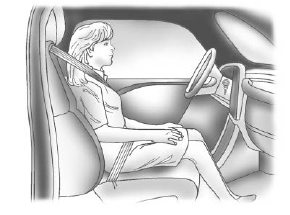
If a person of adult size is sitting in the front outboard passenger seat, but the OFF indicator is lit, it could be because that person is not sitting properly in the seat or that the child restraint locking feature is engaged. Use the following steps to allow the system to detect that person and enable the front outboard passenger frontal airbag:
- Turn the vehicle off.
- Remove any additional material from the seat, such as blankets, cushions, seat covers, seat heaters, or seat massagers.
- Place the seatback in the fully upright position.
- Have the person sit upright in the seat, centered on the seat cushion, with legs comfortably extended.
- If the shoulder portion of the belt is pulled out all the way, the child restraint locking feature will be engaged. This may unintentionally cause the passenger sensing system to turn the airbag off for some adult-sized occupants. If this happens, unbuckle the belt, let the belt go back all the way, and then buckle the belt again without pulling the belt out all the way.
- Restart the vehicle and have the person remain in this position for two to three minutes after the ON indicator is lit.
Warning
If the front outboard passenger airbag is turned off for an adult-sized occupant, the airbag will not be able to inflate and help protect that person in a crash, resulting in an increased risk of serious injury or even death. An adult-sized occupant should not ride in the front outboard passenger seat, if the passenger airbag OFF indicator is lit.
 If the On Indicator Is Lit for a Child Restraint
The passenger sensing system is
designed to turn off the front
outboard passenger frontal airbag if
the system determines that an infant
is present in a child restraint...
 Additional Factors Affecting System Operation
Seat belts help keep the passenger
in position on the seat during
vehicle maneuvers and braking,
which helps the passenger sensing
system maintain the passenger
airbag status...
Other information:
GMC Terrain 2018-2025 Owners Manual: Security
If equipped, OnStar provides these services: With Stolen Vehicle Assistance, OnStar Advisors can use GPS to pinpoint the vehicle and help authorities quickly recover it. With Remote Ignition Block, if equipped, OnStar can block the engine from being restarted...
GMC Terrain 2018-2025 Owners Manual: Power Outlets and Universal Remote System
Power Outlets The vehicle has two 12-volt accessory power outlets, which can be used to plug in electrical equipment, such as a cell phone or MP3 player. There are power outlets: On the center stack below the climate control system. In the rear cargo area...
Copyright © 2025 www.gmcterrain2.com