
GMC Terrain: Keys and Locks / Driver Door Key Lock Cylinder Access (In Case of Dead Battery)
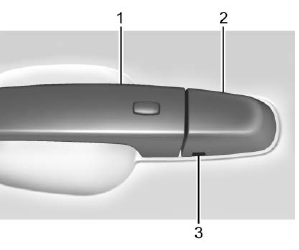
To access the driver door key lock cylinder:
- Pull the door handle (1) to the open position and hold it open until cap removal is complete.
- Insert the key into the slot (3) on the bottom of the cap (2) and lift the key upward.
- Move the cap (2) rearward and remove.
- Use the key in the cylinder.
To replace the cap:
- Pull the door handle (1) to the
open position and hold it open
until cap installation is
complete.
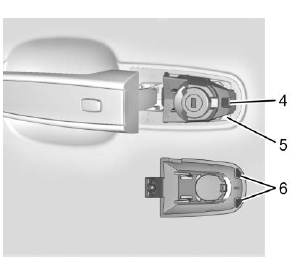
-
Insert the two tabs (6) at the back of the cap between the seal (5) and the metal base (4).
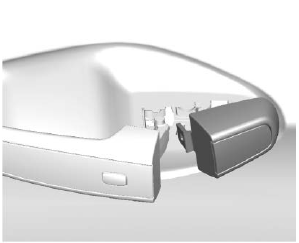
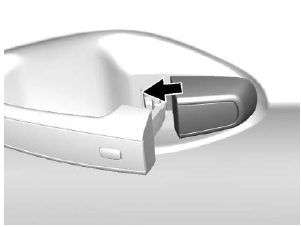
-
Slide the cap forward and press the forward edge to install the cap in place.
-
Release the door handle.
-
Check that the cap is secure.
-
Free-Turning Locks
-
The door key lock cylinder turns freely when either the wrong key is used, or the correct key is not fully inserted. The free-turning door lock feature prevents the lock from being forced open. To reset the lock, turn it to the vertical position with the correct key fully inserted. Remove the key and insert it again. If this does not reset the lock, turn the key halfway around in the cylinder and repeat the reset procedure.
 Door Locks
Warning
Unlocked doors can be
dangerous.
Passengers, especially
children, can easily open
the doors and fall out of a
moving vehicle. The doors
can be unlocked and
opened while the vehicle is
moving...
 Power Door Locks
: Press to lock the doors.
: Press to unlock the doors...
Other information:
GMC Terrain 2018-2025 Owners Manual: Lockout Protection
If the ignition is on or in ACC/ ACCESSORY and the power door lock switch is pressed with the driver door open, all the doors will lock and only the driver door will unlock. If the vehicle is off and locking is requested while a door is open, when all doors are closed the vehicle will check for RKE transmitters inside. If an RKE transmitter is detected and the number of RKE transmitters..
GMC Terrain 2018-2025 Owners Manual: Entry/Exit lighting
Entry Lighting Some exterior lamps and interior lamps turn on briefly at night, or in areas with limited lighting, when is pressed on the Remote Keyless Entry (RKE) transmitter. When a door is opened, the interior lamps come on. They stay on for about 20 seconds. When all of the doors have been closed or the ignition is turned on, they gradually fade out. This feature can be changed. See..