
GMC Terrain: Interior Lighting / Courtesy Lamps and Dome Lamps
Courtesy Lamps
The courtesy lamps come on when
any door is opened and the  OFF
indicator light is turned off. See
Dome Lamps.
OFF
indicator light is turned off. See
Dome Lamps.
Dome Lamps
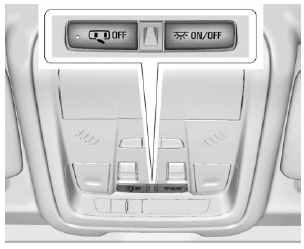
The dome lamp controls are in the overhead console.
To operate, press the following buttons:
 OFF : Press to turn off
the
dome lamps when a door is open.
An indicator light on the button will
turn on when the dome lamp
override is activated. Press
OFF : Press to turn off
the
dome lamps when a door is open.
An indicator light on the button will
turn on when the dome lamp
override is activated. Press  OFF again to deactivate this feature
and the indicator light will turn off.
The dome lamps will come on when
doors are opened.
OFF again to deactivate this feature
and the indicator light will turn off.
The dome lamps will come on when
doors are opened.
 ON/OFF : Press to turn
the dome
lamps on manually.
ON/OFF : Press to turn
the dome
lamps on manually.
 Instrument Panel Illumination Control
The brightness of the instrument
cluster display, infotainment display
and controls, steering wheel
controls, and all other illuminated
controls, as well as feature status
indicators can be adjusted...
 Reading Lamps
There are reading lamps on the
overhead console and over the rear
passenger doors. These lamps
come on when any door is opened.
Front Reading Lamps
The front reading lamps are in the
overhead console...
Other information:
GMC Terrain 2018-2026 Owners Manual: Battery Load Management, Battery Power Protection and Exterior Lighting Battery Saver
Battery Load Management The vehicle has Electric Power Management (EPM) that estimates the battery's temperature and state of charge. It then adjusts the voltage for best performance and extended life of the battery. When the battery's state of charge is low, the voltage is raised slightly to quickly bring the charge back up...
GMC Terrain 2018-2026 Owners Manual: Brake System Warning Light
The vehicle brake system consists of two hydraulic circuits. If one circuit is not working, the remaining circuit can still work to stop the vehicle. For normal braking performance, both circuits need to be working This light should come on briefly when the engine is started...
- Manuals Home
- 2nd Generation Terrain Owners Manual
- 2nd Generation Terrain Service Manual
- Power Outlet 110/120 Volt Alternating Current
- Seat Adjustment
- Seat Adjustment - Manual Front Seats
- New on site
- Most important about car
Categories
Vehicle Personalization
The following are all possible vehicle personalization features. Depending on the vehicle, some may not be available.
For System, Apps, and Personal features and functions, see “Settings” in the infotainment manual.
To access the vehicle personalization menu:
Touch the Settings icon on the Home Page of the infotainment display. Touch Vehicle to display a list of available options. Touch to select the desired feature setting. Touch or R to turn a
feature
off or on.
Touch
or R to turn a
feature
off or on.
Touch  to go to the top
level
of the Settings menu.
to go to the top
level
of the Settings menu.
