
GMC Terrain: Ride Control Systems / (TCS) / (ESC). Turning the Systems Off and On (Base Level DIC)
Caution
Do not repeatedly brake or accelerate heavily when TCS is off. The vehicle driveline could be damaged.
At speeds of 56 km/h (35 mph) or above, this ability to turn off or on is disabled.
TCS and StabiliTrak/ESC can be turned off or on using the DIC controls as follows:
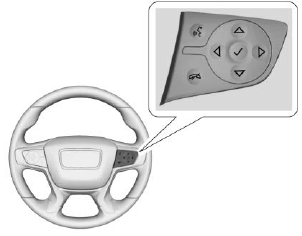
Press  or
or
 to select VEHICLE
menu, then use
to select VEHICLE
menu, then use  or
or
 to scroll
through the menu items to select
TCS/StabiliTrak/ESC.
to scroll
through the menu items to select
TCS/StabiliTrak/ESC.
Press  to enter TCS/StabiliTrak/
ESC, and then use
to enter TCS/StabiliTrak/
ESC, and then use  or
or
 to
select TCS or StabiliTrak/ESC.
to
select TCS or StabiliTrak/ESC.
To turn TCS off, select TCS, then
press  .
.
 will illuminate in the
instrument cluster.
will illuminate in the
instrument cluster.
To turn TCS back on, select TCS,
then press  .
.
 goes out in the
instrument cluster. TCS cannot be
on when StabiliTrak/ESC is off.
goes out in the
instrument cluster. TCS cannot be
on when StabiliTrak/ESC is off.
To turn StabiliTrak off, select
StabiliTrak/ESC, then press  .
If TCS was on when StabiliTrak/
ESC was turned off, both will turn
off and
.
If TCS was on when StabiliTrak/
ESC was turned off, both will turn
off and  and
and
 illuminate in the
instrument cluster.
illuminate in the
instrument cluster.
To turn StabiliTrak/ESC back on,
select StabiliTrak/ESC then press
 .
.
 goes out in the instrument
cluster.
goes out in the instrument
cluster.
To turn both StabiliTrak/ESC and
TCS back on, select Traction, then
press  .
.
 and
and
 go out in the
instrument cluster.
go out in the
instrument cluster.
Adding accessories can affect the vehicle performance. See Accessories and Modifications.
 (TCS) / (ESC). Turning the Systems Off and On (Midlevel Cluster)
Caution
Do not repeatedly brake or
accelerate heavily when TCS is
off. The vehicle driveline could be
damaged.
At speeds of 56 km/h (35 mph) or
above, this ability to turn off or on is
disabled...
 Hill Descent Control (HDC)
HDC can be used when driving
downhill. It sets and maintains
vehicle speed while descending a
very steep incline in a forward or
reverse gear.
The HDC switch is on the center
console...
Other information:
GMC Terrain 2018-2026 Owners Manual: Engine Exhaust
Engine Exhaust Warning Engine exhaust contains carbon monoxide (CO), which cannot be seen or smelled. Exposure to CO can cause unconsciousness and even death. Exhaust may enter the vehicle if: The vehicle idles in areas with poor ventilation (parking garages, tunnels, deep snow that may block underbody airflow or tail pipes)...
GMC Terrain 2018-2026 Owners Manual: Roadside Assistance Program
For U.S.-purchased vehicles, call 1-888-881-3302; (Text Telephone (TTY): 1-888-889-2438). For Canadian-purchased vehicles, call 1-800-268-6800. Service is available 24 hours a day, 365 days a year. Calling for Assistance When calling Roadside Assistance, have the following information ready: Your name, home address, and home telephone number Telephone number of your location Location..
