
GMC Terrain: Vehicle Features / Infotainment System and Cruise Control
Infotainment System
See the infotainment manual for information on the radio, audio players, phone, navigation system, and voice or speech recognition. It also includes information on settings.
Steering Wheel Controls
The infotainment system can be operated by using the steering wheel controls. See “Steering Wheel Controls” in the infotainment manual.
Cruise Control
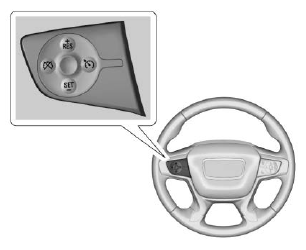
 : Press to turn the cruise
control
system on and off. A white indicator
comes on in the instrument cluster
when cruise is turned on.
: Press to turn the cruise
control
system on and off. A white indicator
comes on in the instrument cluster
when cruise is turned on.
 : Press to disengage cruise
control without erasing the set
speed from memory.
: Press to disengage cruise
control without erasing the set
speed from memory.
+RES : If there is a set speed in memory, press to resume that speed or press and hold to accelerate. If cruise control is already active, use to increase vehicle speed.
−SET : Press briefly to set the speed and activate cruise control. If cruise control is already active, use to decrease vehicle speed.
See Cruise Control or Adaptive Cruise Control (if equipped).

 Driver Information Center (DIC)
The DIC display is in the instrument
cluster. It shows the status of many
vehicle systems.
or
: Press to move up or
down in a list.
or
: Press to move between
the interactive display zones in the
cluster...
Other information:
GMC Terrain 2018-2026 Owners Manual: Universal Remote System Operation
Using the Universal Remote System Press and hold the appropriate Universal Remote system button for at least one-half second. The indicator light will come on while the signal is being transmitted. Erasing Universal Remote System Buttons Erase all programmed buttons when vehicle ownership is terminated...
GMC Terrain 2018-2026 Owners Manual: Battery Load Management, Battery Power Protection and Exterior Lighting Battery Saver
Battery Load Management The vehicle has Electric Power Management (EPM) that estimates the battery's temperature and state of charge. It then adjusts the voltage for best performance and extended life of the battery. When the battery's state of charge is low, the voltage is raised slightly to quickly bring the charge back up...
