
GMC Terrain: Driving Information / Certification/Tire Label
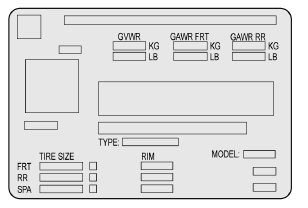
Label Example
A vehicle-specific Certification/ Tire label is attached to the center pillar (B-pillar).
The label may show the size of the vehicle's original tires and the inflation pressures needed to obtain the gross weight capacity of the vehicle. The label shows the gross weight capacity of the vehicle. This is called the Gross
Vehicle Weight Rating (GVWR). The GVWR includes the weight of the vehicle, all occupants, fuel, and cargo.
The Certification/Tire label may also show the maximum weights for the front and rear axles, called the Gross Axle Weight Rating (GAWR). To find out the actual loads on the front and rear axles, weigh the vehicle at a weigh station. Your dealer can help with this. Be sure to spread the load equally on both sides of the centerline.
Caution
Overloading the vehicle may cause damage. Repairs would not be covered by the vehicle warranty. Do not overload the vehicle.
Warning
Things inside the vehicle can strike and injure people in a sudden stop or turn, or in a crash.
- Put things in the cargo area of the vehicle. In the cargo area, put them as far forward as possible. Try to spread the weight evenly.
- Never stack heavier things, like suitcases, inside the vehicle so that some of them are above the tops of the seats.
- Do not leave an unsecured child restraint in the vehicle.
- Secure loose items in the vehicle.
- Do not leave a seat folded down unless needed.
 Vehicle Load Limits
It is very important to know how
much weight the vehicle can
carry. This weight is called the
vehicle capacity weight and
includes the weight of all
occupants, cargo, and all
nonfactory-installed options...

Other information:
GMC Terrain 2018-2026 Owners Manual: Engine Heater
Warning Do not plug in the engine block heater while the vehicle is parked in a garage or under a carport. Property damage or personal injury may result. Always park the vehicle in a clear open area away from buildings or structures. The engine heater, if available, can help in cold weather conditions at or below −18 °C (0 °F) for easier starting and better fuel economy during engine..
GMC Terrain 2018-2026 Owners Manual: Surround Vision. Front Vision Camera and Rear Vision Camera (RVC)
Surround Vision If equipped, views around the vehicle appear in the infotainment display to aid with parking and low-speed maneuvers. See “Surround Vision” under Assistance Systems for Parking or Backing. Front Vision Camera If equipped, a view of the area in front of the vehicle appears on the infotainment display to aid with parking and low-speed maneuvers. See “Front Vision Camera..
