
GMC Terrain: Lower Anchors and Tethers for Children (LATCH System) / Lower Anchors
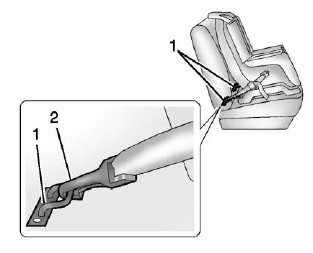
Lower anchors (1) are metal bars built into the vehicle. There are two lower anchors for each LATCH seating position that will accommodate a child restraint with lower attachments (2).
 Lower Anchors and Tethers for Children (LATCH System)
The LATCH system secures a child
restraint during driving or in a crash.
LATCH attachments on the child
restraint are used to attach the child
restraint to the anchors in the
vehicle...
 Top Tether Anchor
A top tether (3, 4) is used to secure
the top of the child restraint to the
vehicle. A top tether anchor is built
into the vehicle. The top tether
attachment hook (2) on the child
restraint connects to the top tether
anchor in the vehicle in order to
reduce the forward movement and
rotation of the child restraint during
driving or in a crash...
Other information:
GMC Terrain 2018-2026 Owners Manual: Park Assist and Automatic Parking Assist (APA)
Park Assist If equipped, Rear Park Assist (RPA) uses sensors on the rear bumper to assist with parking and avoiding objects while in R (Reverse). It operates at speeds less than 8 km/h (5 mph). RPA may show a warning triangle on the infotainment display and a graphic on the instrument cluster to provide the object distance...
GMC Terrain 2018-2026 Owners Manual: StabiliTrak OFF Light
This light comes on briefly while starting the vehicle. If it does not, have the vehicle serviced by your dealer. This light comes on when the StabiliTrak/Electronic Stability Control (ESC) system is turned off. If StabiliTrak/ESC is off, the Traction Control System (TCS) is also off...
- Manuals Home
- 2nd Generation Terrain Owners Manual
- 2nd Generation Terrain Service Manual
- Instrument Panel
- Vehicle Alarm System
- Interior Lighting
- New on site
- Most important about car
Categories
Vehicle Messages
Messages displayed on the DIC indicate the status of the vehicle or some action that may be needed to correct a condition. Multiple messages may appear one after another.
The messages that do not require immediate action can be acknowledged and cleared by pressing V. The messages that require immediate action cannot be cleared until that action is performed.

Copyright © 2026 www.gmcterrain2.com